01
Same Size
Keep selected follower accounts at the same contract quantity as the leader.
Native NinjaTrader 8 AddOn · Founding pricing live
Stop entering the same trade account by account. Turn one leader decision into a coordinated multi-account workflow—right inside NinjaTrader 8.
Choose Same Size, Ratio, or Fixed Quantity copying. Group only the accounts you want, control follower sizing, and keep fast safety actions within reach.
From $23.20/month on the six-month plan. Your founding rate stays locked while your subscription remains active.
One leader
Stop duplicate order entry
Three copy modes
Same Size, Ratio, or Fixed
Fast account control
Pause, flatten, and cancel
Founding price lock
Keep your rate while active
Copy on your terms
Pick the copy mode that fits the plan, choose the accounts that belong in it, and let one leader workflow do the repetitive work.
Keep selected follower accounts at the same contract quantity as the leader.
Scale follower size up or down with an assigned multiplier for each account workflow.
Set a consistent contract quantity for a follower when the leader size changes.
Your next trade should not need ten order tickets
Put one controlled workflow between your idea and every account you manage.
The operating desk
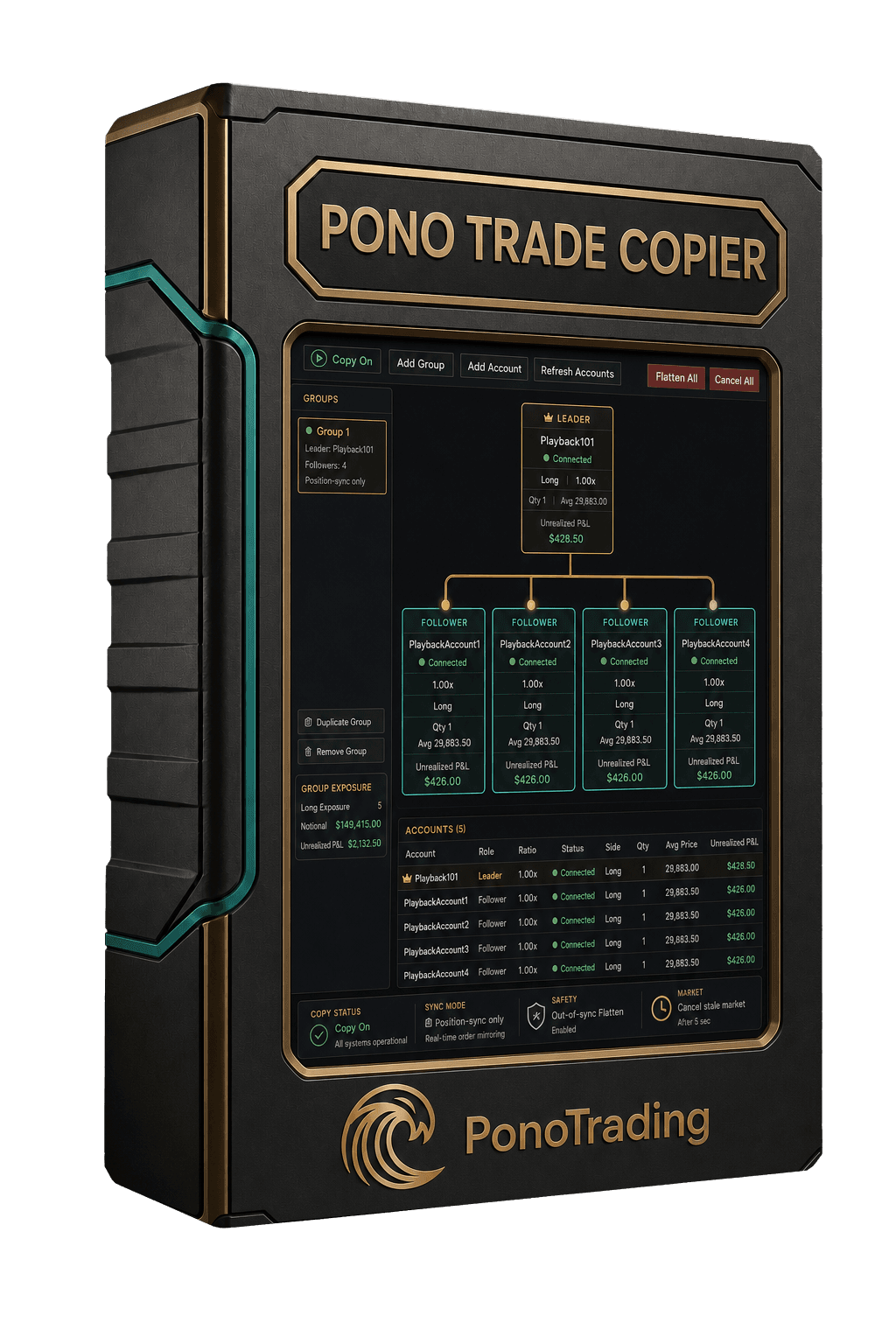
Keep the leader, follower accounts, sizing, group status, and emergency actions together in one focused NinjaTrader workspace.
Pono Trade Copier
Native NinjaTrader AddOn workflow preview
Active group
Group 1 / Leader-A
Control when it matters
Pono keeps account roles visible and puts pause, flatten, and cancel actions close at hand—so scaling execution does not have to scale avoidable confusion.
One account can hold only one active copier role. Duplicate leaders, reused followers, and leader/follower overlap are blocked before Copy On.
Only one Pono Trade Copier tab or window can own the active copy session, reducing duplicate execution from restored workspaces.
Configurable checks can retry a position sync, flatten opposite or residual exposure, and cancel copier market orders that remain stale.
Cancel or flatten at the account, group, or all-groups level without hunting through separate windows during a fast market.
Flatten one follower and hold it out of the current leader trade so the next sync does not immediately pull it back in.
Build a diagnostic bundle locally, review what it contains, and decide whether to share it. Nothing uploads automatically.
Founding launch pricing · limited launch window
Start standalone from $29/month, or move to Kahuna and get the copier inside the complete Pono trading stack while this launch benefit remains available.
Lock in the founding rate
Your selected price continues while that subscription remains active and in good standing. Canceling ends the price lock, and future pricing may be higher if you return.
Monthly
$29/ month
$29 billed every month
Flexible month-to-month billing
Checkout via Whop.
3 months
$26.10/ month
$78.30 billed every 3 months
Save 10% on every billing period
Checkout via Whop.
6 months
$23.20/ month
$139.20 billed every 6 months
Save 20% on every billing period
Checkout via Whop.
Best total value
Get the copier plus everything in Haumana, SessionRanges Algo access, advanced risk tools, premium alerts, and priority releases from $99/month. FundedFlow is already free with a registered login. Active Kahuna members retain copier access while their membership remains active; this launch inclusion may not be offered to future new members.
Before you copy
No. Pono Trade Copier is a native AddOn that runs inside NinjaTrader 8 on Windows.
Choose Same Size, Ratio, or Fixed Quantity copying based on how you want each account group to follow the leader.
No. The startup preflight blocks overlapping active roles across groups, tabs, and windows to reduce duplicate-copy risk.
No. Haumana members can add Pono Trade Copier as a standalone subscription or upgrade to Kahuna.
Yes. Pono Trade Copier is currently included with Kahuna as a founding launch benefit. Active Kahuna members retain that access while their membership remains active and in good standing.
Your selected standalone rate continues while that subscription remains active and in good standing. If you cancel and return after pricing changes, the original rate may no longer be available.
No. Start in NinjaTrader Playback or Sim101, validate account assignments and ratios, then decide whether the workflow is appropriate for your own account rules.
No. Broker and prop-firm rules vary. You remain responsible for confirming whether copying and account configurations are permitted.
Trading futures involves substantial risk. Software cannot eliminate execution, connection, broker, market, or operator risk. Validate every account and control in Playback or simulation before considering live use.